QUICK QUOTE
LUNA BUILT IN
Know who is looking, and what to do next.
Quick Quote watches every quote you send and puts the ones that need you at the top of your home screen, from the customer who wants to book to the prices about to run out.

See what your customer is doing
Looking at it now, how many times they have opened it and which way they came in: email, WhatsApp, text, chat, link, QR code or PDF.
You also see the item they spent longest on, their time on the price and whether a second device opened it, which can mean it has been shared.
Looking at it now, and how often
The item they spent longest on
Whether your email was delivered, bounced or marked as spam

Needs you
A ranked list on your home screen, so you always know which customer to call first.
Wants to book
An email that did not arrive
Changes asked for
Today’s prices asked for
Looking now
A follow-up ready
Prices running out
Not yet opened
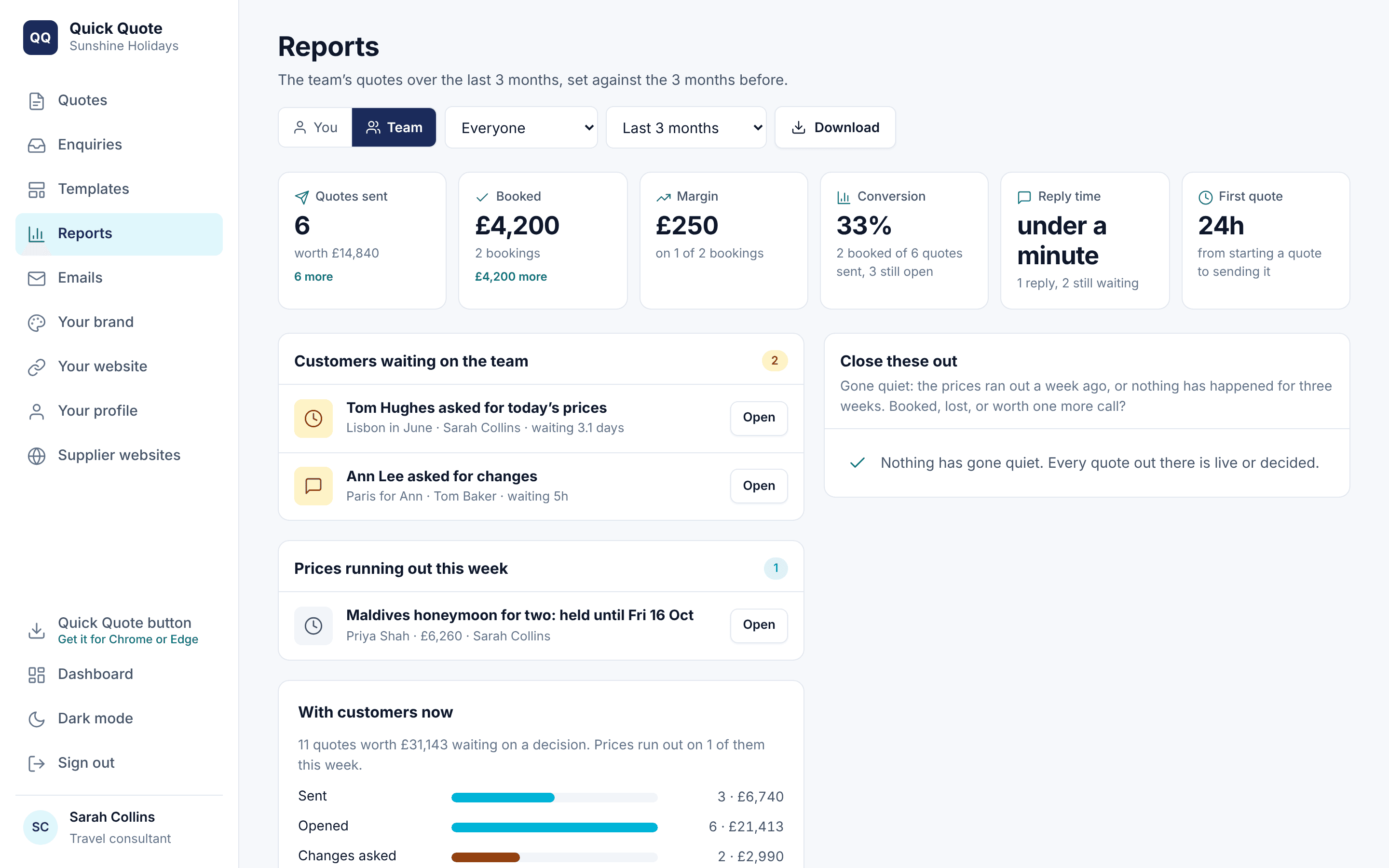
Reports for you and your team
Every agent sees their own figures, and owners and admins see the whole team.
Quotes sent, booked, margin, conversion, reply time and time to first quote, with a 12-week trend, the reasons quotes were lost and a download.
Your own figures and the team’s
A 12-week trend
Why quotes were lost
Close every quote out
Every quote ends booked, lost or still in play, and you can see which.
Booked or lost
Mark a quote booked, with its value, or lost, with one of six reasons. Reopen it if they come back.
Close these out
A list of the quotes that have gone quiet, so you can decide: booked, lost or worth one more call.
Enquiries
Your website enquiries, each one a press away from a draft quote.
Your quotes in Luna Work
When Luna Work is switched on for your agency, each quote goes onto the customer there as you send it. Quick Quote matches them by email, then phone, or adds them as a new customer.
Every version you send is kept, with what happened next: opened, changes asked for, wants to book, booked or lost. Your customer’s private link, your notes and your costs stay in Quick Quote.
On the customer’s record as you send
Every version, and what happened next
Your notes and costs never leave Quick Quote
Questions people ask
Can I see when a customer opens the quote?
Yes. Quick Quote shows when they are looking at it now, how many times they have opened it and which way they came in.
How do I record a booking?
Mark the quote booked with its value, or lost with the reason. You can reopen it at any time.
Can managers see the whole team?
Yes. Owners and admins see the team’s reports as well as their own.
Will Luna chase my customers for me?
Luna drafts follow-ups at 2, 7, 14 and 21 days. You check each one and press Send, so nothing goes without you.
Do my quotes go into Luna Work?
Yes, when Luna Work is switched on for your agency. Each quote goes onto the customer as you send it, with every version and what happened next. Your notes and costs stay in Quick Quote.
Quick Quote is included on Ignite and Bespoke. Book a demo, or talk to your account manager about switching it on.
MORE ABOUT QUICK QUOTE