/ Quick Quote
QUICK QUOTE
LUNA BUILT IN
Show your customers the whole holiday in one beautifully presented quote: photos, the itinerary, clear prices and a simple way to tell you they want to book. All in your agency’s brand.
4.8 out of 5 ★★★★★
Google reviews
TTG innovation finalist
2025 & 2026
Included on Ignite and Bespoke.

YOUR AGENCY · PRIVATE QUOTE
Prepared for Sam & Alex
2 travellers · 7 nights
Hotel, flights & transfers
Every detail. In your brand.
things to add to a quote
ways to send it
choices on one item
looks for your quotes
THE QUOTE YOUR CUSTOMER RECEIVES
A private page in your brand, with the whole holiday in one place. Explore this example to see the photos, prices, flights, hotel and map your customer receives.
EXAMPLE CUSTOMER QUOTE
Scroll to explore the whole holiday ↓


Example quote shown in Sunshine Holidays branding. Prices and traveller details are for demonstration.
Choose one of four looks for the page, the PDF and the emails. The price shows each line or just the total, including anything paid locally.
Ask for a change, or tell you they want to book, in one press
Their trip on a map, in the quote and the PDF
A PDF of the same quote, with a QR code back to it
FROM THE FIRST IDEA TO THE FOLLOW-UP
Bring in the holiday, build the proposal and keep the conversation moving.
1
From a supplier website, your Travelify search, a live cruise, an enquiry or a few words.
Import a holiday
2
One holiday or up to five side by side, with choices for your customer and your margin on every line.
Build the proposal
3
By email, WhatsApp, text message, live chat, link or QR code, always in your brand.
Choose how to send
4
See who is on the quote now, how interested they are and which quotes need you today.
See the follow-up
BRING IN THE DETAILS
Paste a link from a tour operator’s website and the holiday comes in laid out as items: the description, the day by day, the photos and the price where the page shows one.
Or save holidays from your own Travelify website, press the Quick Quote button in Chrome or Edge, drop in screenshots or a PDF, find a cruise with live prices or simply describe the trip.
Named tour operator and holiday websites, with more being added
Search your connected suppliers on Travelify
69 cruise lines with live sailings and cabin prices
Change anything that comes in before you send
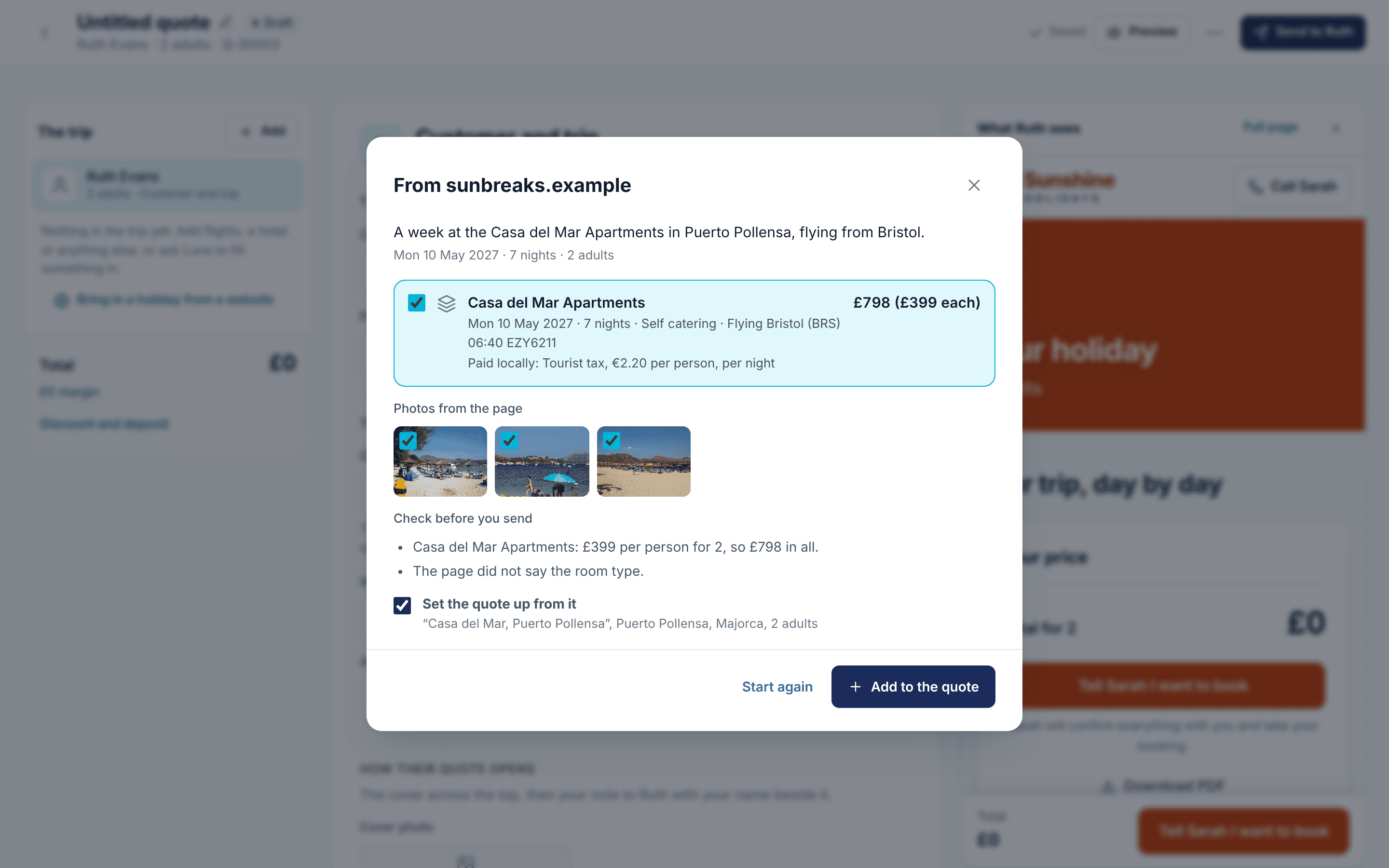
Import a holiday, then check the details.

Luna helps prepare the quote. You review it.
AN ASSISTANT, BUILT IN
Luna is the AI built into Quick Quote. It reads supplier pages, fills in an item from a description, writes your covering message and drafts your follow-ups.
Nothing Luna writes reaches your customer until you add it to the quote or press Send.
Prices are never made up: they come from the page, or you add them
Luna never sees your costs, margins or notes
Luna Brain adds destination guides, weather averages and travel advice
TWO TO FIVE HOLIDAYS
Put two to five whole holidays into one quote, each with its own place, dates, travellers, price and held-until date. Your customer gets one link, one email and one PDF.
They see each holiday as a card, put them side by side and pick one. Mark your recommended pick, copy an option to change it or start one from a template.
Two to five holidays in one quote
Compare side by side, or show only the differences
A PDF that opens by comparing them

Build options with their own dates and prices.
KEEP THE CONVERSATION GOING
Review recorded activity on the email, PDF and quote page, and see which proposals are getting attention. A live notification lets your team know when a customer is viewing a quote.
Your home screen ranks the quotes that need you today and shows your own numbers: sent, out with customers, booked and lost, and what each is worth.
Luna drafts follow-ups at 2, 7, 14 and 21 days for you to check and send
An email when a quote goes hot or is shared
Reports for you and for the whole team

Review quote activity and decide who to follow up.
THE CONNECTED WORKING DAY
Bring your Travelify search, your branding and Luna Brain’s travel knowledge into the proposal.
Save holidays from your connected suppliers through your Travelify website, ready to bring into Quick Quote.
Every email, quote page and PDF carries your name, logo and colours. Replies go to the agent who made the quote.
Destination and airport guides, monthly weather averages and the Foreign Office’s advice, added to the quote without typing.
SIX PRACTICAL WALKTHROUGHS
Included on Ignite and Bespoke. Here is how each part works.
Links, the Quick Quote button, screenshots, PDFs, your Travelify search and live cruises.
Up to five holidays in one quote, 15 things to add, deposits and your margin.
What Luna drafts for you, the rules it works to, Luna Brain and your own guides.
Email, WhatsApp, text message, live chat, link and QR code, or send the PDF yourself.
A private page in your brand, with a map of the trip, four looks and one press to say yes.
Who is on a quote now, how interested they are, your numbers and reports.
A FEW USEFUL ANSWERS
Ask us about your agency, your plan or the way your team quotes.
Quick Quote is included on Ignite and Bespoke. Talk to your account manager about switching it on.
From supplier and tour operator websites by link, the Quick Quote button, screenshots or a PDF, from your own Travelify website search and from live cruise sailings. Visitors to your website can also ask for a quote from their favourites. You can type anything in, or let Luna set up a quote from a description or a website enquiry.
Yes. Put two to five whole holidays into one quote, each with its own dates, travellers and price. Your customer compares them side by side and picks one.
No. A price comes from the supplier’s page, worked out from what the page says, or you add it yourself. Anything unclear becomes a note for you to check.
Book this holiday books exactly what Travelify priced. It appears when the quote is a holiday saved from your Travelify website that you have not changed. Change the price, dates, room, flights or travellers, or add a discount, and your customer presses a button that tells you they want to book instead. Quick Quote never takes payment.
By email, WhatsApp, text message, live chat, a link or a QR code. Each way is recorded, so you can see which one your customer opened.
No. Their quote page, emails and PDF carry your agency’s name, logo and colours.
See how Quick Quote fits your agency. Included on Ignite and Bespoke.